


1. What Are Practice Reminders?
Practice Reminders are a built-in scheduling tool that lets you set regular email or SMS text reminders to play. You choose the days, time, and frequency and you’ll receive a reminder. It's the simplest way to stay accountable and turn intention into a daily habit.
Your logged practice on the Practice calendar also connect directly to the Practice Streak Tracker. When you log offline practice time, it counts as a qualifying streak activity for that day
2. How to Set Up a Practice Reminder
Getting started takes less than a minute.
1. Navigate to guitartricks.com/practice or find Practice in the left menu navigation.
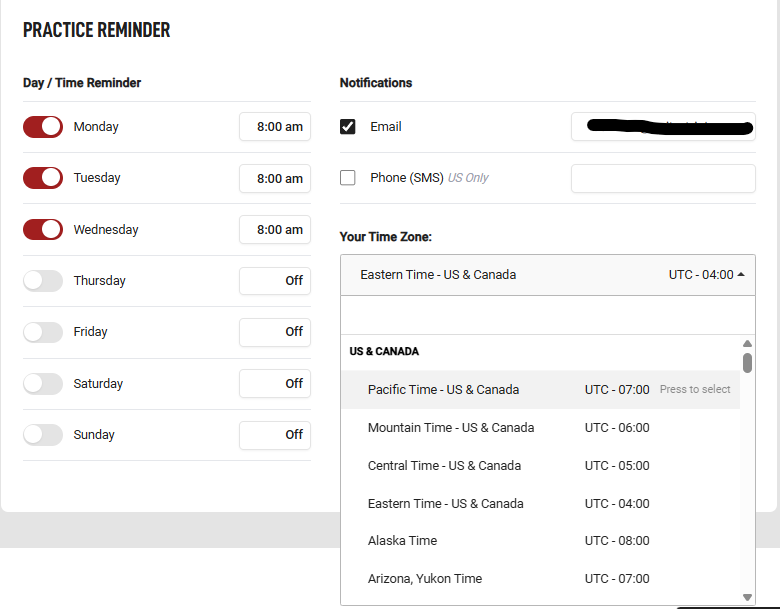
2. Choose the days of the week you want to receive reminders.
3. Set your preferred reminder time (the time you typically sit down to practice).
4. Save your preferences and reminders will start arriving on your chosen schedule.
Tip: Setting reminders for the same time each day is the single most effective habit-building strategy. Even 15 minutes at a consistent time beats an occasional hour-long session.
3. Logging Offline Practice Time
Practiced without watching a lesson? No problem! You can log that time manually. This is especially useful for members who:
• Practice technique drills or scales on their own
• Jam along to songs without using the lesson player
• Work on songwriting or improvisation sessions
• Play in a band setting or rehearse with others
To log offline practice time:
1. Go to guitartricks.com/practice or find Practice in the left menu navigation.
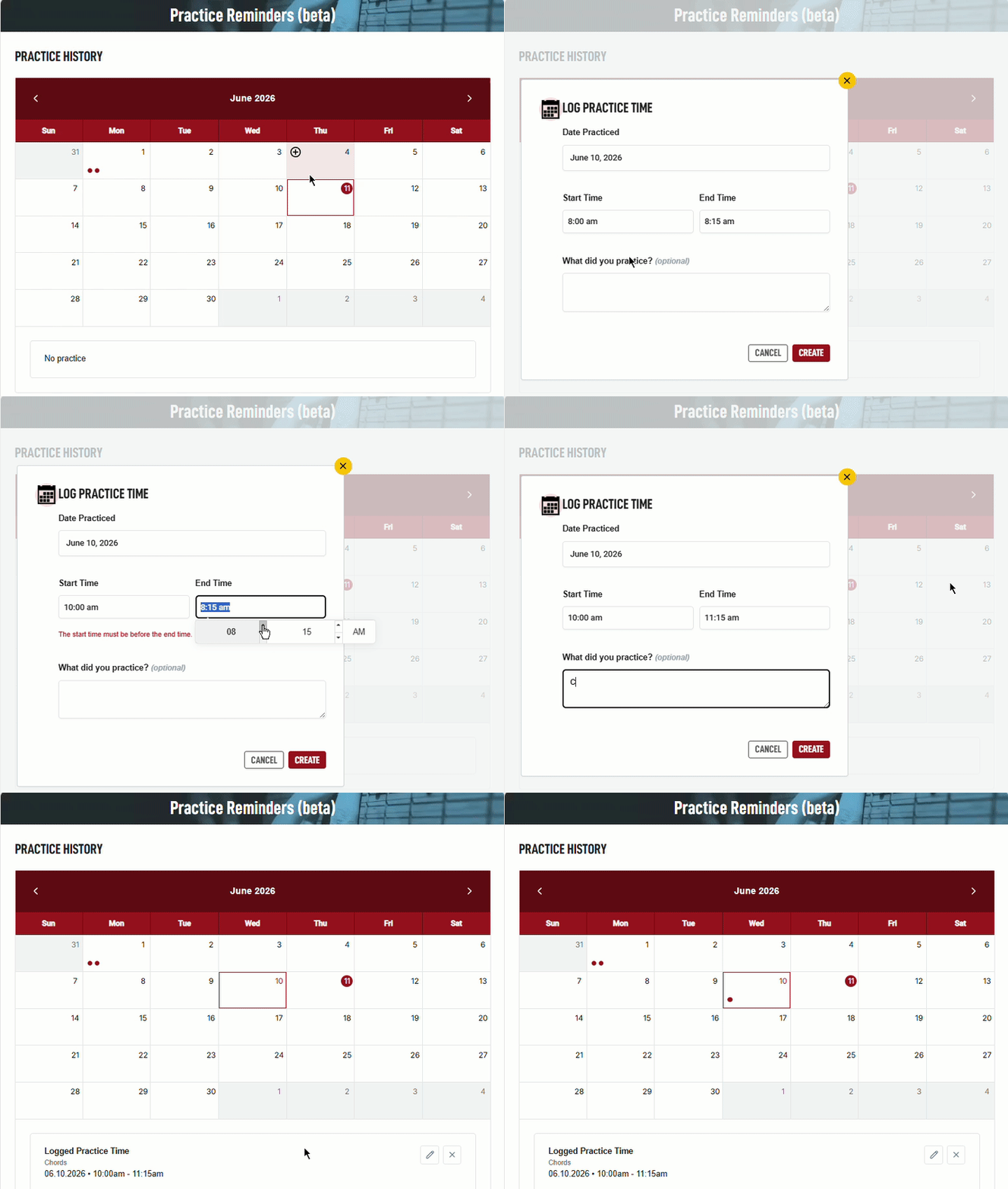
2. Go to the current day, or a previous day, select the (+) icon for 'Log Practice Time' and confirm the date and duration of your session.
3. Save and your streak will update automatically for any qualifying days.
4. Streak Connection
Logging offline practice time counts as a streak day. If you logged practice for days you missed in the tracker, the system will retroactively recover your streak.
Important
Setting up a practice reminder does NOT itself count as a streak day. Only completing a qualifying event on the day or logging offline time qualifies.
5. Best Practices for Building a Habit
1. Start small - even 10 minutes a day is enough to build momentum.
2. Set reminders for a time when you're usually free and alert.
3. Log offline sessions the same day you practice, while it's fresh.
4. Use the Practice Streak Tracker alongside reminders to stay motivated.
5. If you miss a day, log practice retroactively rather than letting the streak reset.
Frequently Asked Questions
Will I get an email every day?
Only on the days you select when setting up your reminders. If you choose Monday, Wednesday, and Friday, you'll only receive reminders on those days.
Does setting up a reminder count toward my practice streak?
No. Configuring the reminder feature does not count. You need to complete a qualifying practice activity to extend your streak for the day.
Can I log practice for days that already passed?
Yes, you can retroactively log offline practice time for past days. The system will recalculate your streak to include those days automatically.
Where do I find my practice history?
The Practice Dashboard at guitartricks.com/practice shows your full practice history visually by day and month.
Consistency is the most underrated skill in guitar. Show up every day and see real progress.


